
Creating a Timed Effect
Timed effects apply gameplay state for a duration and must correctly handle expiration, pause, resume, and early stop.
Use an Effect Component
- Create a Blueprint subclass of
UCrowdControlEffectComponentas described in Creating a Basic Effect. - Set Duration to a value greater than zero. The editor accepts up to 600 seconds.
- Add that component Blueprint to the actor that owns the gameplay behavior.
- Disable Auto Register for a level-placed component.
- Call Register from
OnSessionReady. - Override OnEffectTriggered, apply the gameplay state, and return Success.
- Use the component Blueprint's Override menu to add OnEffectStopped, then restore the original gameplay state there.
When a request supplies a positive duration, the component uses that value; otherwise, it uses the configured default. A successful response starts the component's local countdown.
Pause and Resume
Call Pause when the duration should stop advancing, such as during:
- pause menus,
- cutscenes,
- loading screens,
- non-gameplay states.
Pause freezes the local timer, reports the pause to Crowd Control, and invokes On Effect Paused. Resume reverses those actions and invokes On Effect Resumed.
Use:
- Is Running
- Is Paused
- Get Time Remaining
to drive UI or game-state decisions.
Stop Early
Call Stop to end the effect before its timer expires. The component reports the stop, clears its local state, and invokes On Effect Stopped.
Make On Effect Stopped idempotent: it should be safe to run once during normal expiry, explicit stop, or actor teardown.
Overlapping Requests
While a timed component is already running, another request routed to the same component is answered with a temporary failure. If stacking or extension is desired, implement the effect through the global delegate flow instead and define the policy explicitly.
Pending Timed Effects
Return Pending when activation requires asynchronous work. Call Complete Success only after the effect is actually active. For a timed component, completion starts the configured local duration.
If activation fails, call Complete Fail Temporary or Complete Fail Permanent instead.
Manual Timed Effects
The delegate-based alternative is:
- Call Setup Timed Effect from
OnSessionReady. - Bind OnTimedEffectTrigger.
- Apply the gameplay state.
- Call Effect Success with the request ID.
- Track the supplied
Durationin your own system. - Use
PauseEffect,ResumeEffect,ResetEffect, andStopEffectto report lifecycle changes.
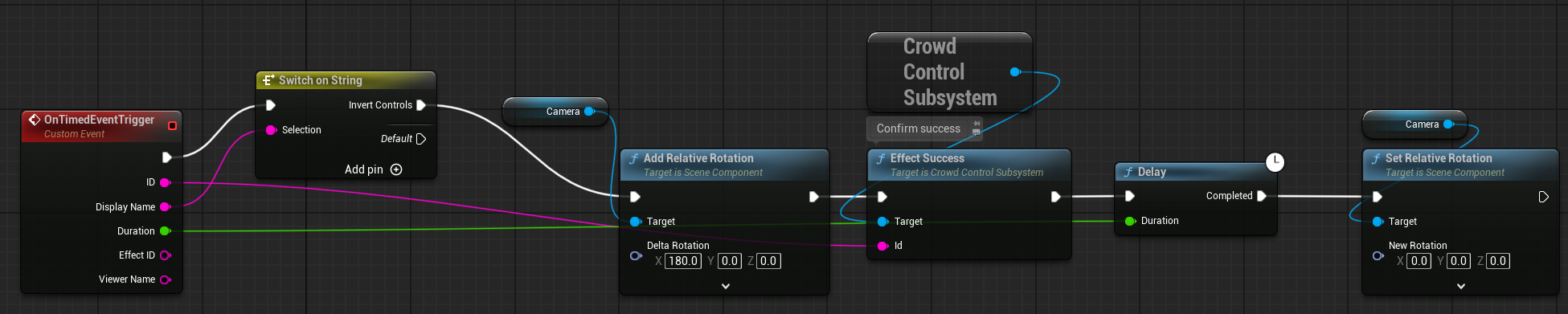
With this path, your game is responsible for all local timers and cleanup.
Continue with Starting a Session and Testing Effects.