
Sending Pack Metadata
Pack metadata reports live game state to a Crowd Control game pack. For example, a pack can use metadata to react to the current level, difficulty, game mode, or other state that is not represented by an effect response.
Metadata is not an effect response. Continue to call EffectSuccess or an appropriate failure function exactly once for every effect request.
Before Sending Metadata
- Get the
CrowdControlSubsystemwith Get Game Instance Subsystem. - Wait for
OnSessionReady, or checkIsInitialized, before sending metadata. - Send an update when the represented state changes. Do not send the same values every Tick.
The metadata keys consumed by a game pack are part of that pack's contract. Coordinate the exact key names and value types with the pack developer.
Send One String Value
Two Blueprint nodes send one string key/value pair:
| Node | Use |
|---|---|
| Effect Metadata | Compatibility entry point for integrations that use the native EffectMetadata export. |
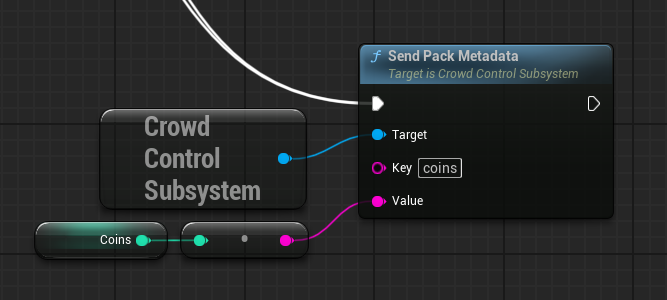
| Send Pack Metadata | Preferred descriptive node for sending one string value. It serializes the pair as a JSON object. |
For example, use key current_level and value castle when entering the castle level.
Both nodes update pack metadata. Use one convention consistently; do not call both for the same state change.
The following example publishes the current coin count when the value changes:
Send a JSON Object
Use Send Pack Metadata Json to update several values at once or to preserve JSON value types:
{
  "current_level": "castle",
  "difficulty": "hard",
  "player_health": 75,
  "boss_active": true
}
The input must be a JSON object. Arrays, scalar JSON values, and malformed JSON are rejected by the native plugin.
Blueprint string literals require escaped quotation marks. For larger payloads, build the string from your game state in one place so the emitted JSON remains valid and the key names remain consistent.
Blueprint Example
A typical level Blueprint or game-state manager uses this flow:
- Receive the event that changes the relevant game state.
- Get the
CrowdControlSubsystem. - Branch on
IsInitialized. - Call Send Pack Metadata, with
current_levelas the key and the new level identifier as the value.
For multiple related values, call Send Pack Metadata Json once instead of sending many individual updates.
Reconnection and Initial State
OnSessionReady can fire again after a reconnect. When it fires, send a snapshot of the current metadata so Crowd Control does not have to wait for the next gameplay change.
Keep this snapshot routine idempotent: it should report current state without changing gameplay or registering duplicate delegates.
Troubleshooting
- The node logs "Currently not initialized": wait for
OnSessionReadybefore sending. - The node reports an unsupported DLL export: replace
Plugins/UnrealCrowdControl/Binaries/Win64/CrowdControl.dllwith the DLL version shipped for this plugin. - JSON metadata does not arrive: verify that the input is a JSON object and inspect the Unreal Output Log for a native validation message.
- The pack ignores an update: verify the key spelling and expected value type with the pack developer.
Continue with Starting a Session and Testing Effects.